The Dash Browser Extension adds a side panel in Chrome where users can ask Dash, GovDash's assistant, about the webpage they are currently viewing. This article is written for the administrators and security reviewers who approve and deploy it. It covers what the extension can access, how that data moves, and the controls you have over it.
For functional walkthroughs of the extension itself, see our Dash Browser Extension documentation here.
Set Up in 4 Steps
Setup touches three roles. Confirm each one is in place before you start:
GovDash Team Admin: needs the Manage Team Integrations permission on the team to enable and configure the extension.
Chrome Workspace Admin: approves or force-installs the extension for the right user group.
End User: signs in to GovDash and has Assistant access.
Once those are set, the rollout is four steps:
The Chrome Workspace admin approves or force-installs the Dash Browser Extension.
The GovDash team admin enables the browser extension in the integration settings in GovDash.
Optional: the GovDash team admin turns on Extension Assistant Consent, which prompts users to confirm before each use.
The user opens the side panel, signs in to GovDash, and runs Dash against the current page.
Permissions and Scoping
Chrome Permission Scopes
The extension requests four scopes. Each maps to a specific function rather than broad access:
Chrome Permission | Why Requested |
sidePanel | Displays Dash in Chrome's side panel. |
scripting | Reads active-page context by running a script in the active tab. |
cookies | Reads the GovDash CSRF cookie for authenticated iframe requests only. |
<all_urls> | Lets the extension work on the arbitrary, customer-selected pages a user chooses to use it on. |
GovDash permissions
Manage Team Integrations: enable or disable the extension and its consent settings.
Read in Assistant: use Dash from the extension.
Roles & Permissions
For more information on configuring roles and permissions within GovDash, please see our support article here.
CUI Handling
The extension does not automatically scan webpage data for CUI, so treat webpage context as CUI whenever the page itself contains CUI. When a thread or its attached GovDash context is already CUI, the assistant locks the message classification to CUI. Uploaded files and images are classified at the point of attachment.
Data Shared with GovDash
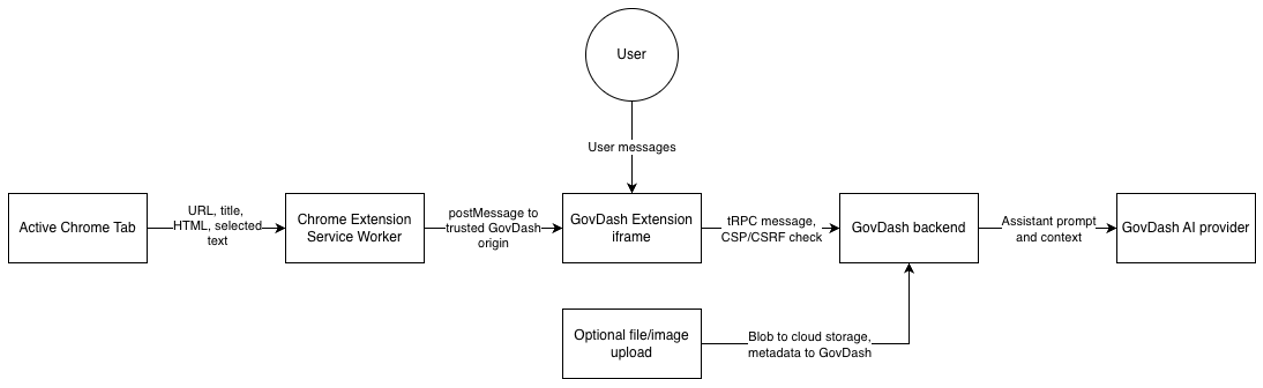
When a user runs Dash from the extension, the following is sent to GovDash:
The active page URL and title.
The page HTML, sanitized before it reaches the assistant.
Selected text, capped at 10,000 characters.
The user's message and chosen assistant sources.
Any files or images the user attaches through the attachment path.
Data Flow Diagram
Security Guarantees
The visited website never receives GovDash responses or iframe messages. The extension posts messages only to the GovDash iframe origin.
The extension validates the iframe origin before accepting any request, including requests for page context or a CSRF token.
GovDash's content security policy allows the application to be framed only by the Dash Browser Extension ID, and authenticated API calls use session-bound CSRF protection.
The manifest does not expose an externally connectable API.
FAQ
Is the extension ingress-only, and does it ever write data back?
Yes, it is ingress-only. The extension reads context from the active tab and uploads it to GovDash. It does not write anything back to the website. The captured page context is the URL, title, full HTML, HTML length, selected text up to 10,000 characters, and a timestamp.
This webpage context is text, not blob data. Separate, user-initiated file or image uploads follow the assistant attachment path: the file is uploaded, a SAS token is generated, and it becomes a GovDash document or attachment.
How does the extension access browser data?
It relies on four scopes: sidePanel, scripting, cookies, and <all_urls> host access. There is no persistent content script. The extension programmatically runs its own functions in the active http(s) tab through chrome.scripting.executeScript to read page context and attach change listeners. The manifest declares only background, permissions, and host_permissions; there is no content_scripts entry.
What stops a website from hijacking or exfiltrating data from the extension?
The side panel only posts messages to the configured GovDash iframe origin, so a visited website never receives them. The iframe request handler accepts a message only when both event.source and event.origin match the expected GovDash iframe.
What data is shared outside of GCC High?
The extension sends captured browser context only to the configured GovDash web origin. Once a user submits a Dash request, that context becomes part of the request and may travel through GovDash's configured AI provider path, consistent with the standard Dash assistant controls.
How does CUI tagging work in this context?
Extension webpage context is included in a user message only when the EXTENSION_WEBPAGE bundle is allowed. Message and thread classification follows the assistant classification flow: CUI attachments or an existing CUI thread lock new messages to CUI. In practice, the CUI controls are the same as the Dash assistant's.