Adding Solution Information
If your team has capture or solutioning information for this bid, add it to the questions in your opportunity's Capture Plan. GovDash uses those answers when it writes your proposal.
From your proposal, go to the left menu and click a phase under CAPTURE PLAN (for example, Solution). Your team may use different phase names. Questions are grouped into tabs, and you type each answer in the box under the question. Your team can edit answers at the same time.
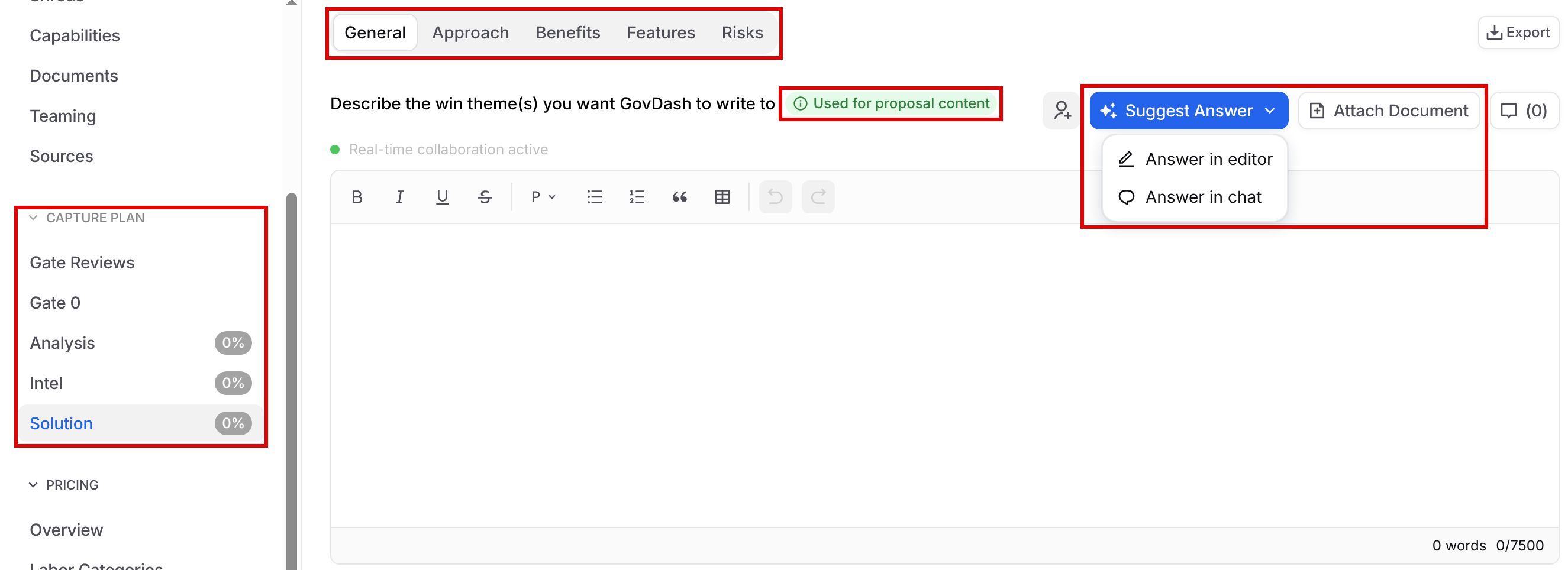
Each question shows Used for proposal content or Not used for proposal content. Only questions marked Used for proposal content are used when GovDash writes your proposal. This is set for each question in your capture plan template. To learn more, see Managing Capture and Solutioning.
Answers are saved on the opportunity, so anything your capture team already entered in the Pipeline is already here. You can update answers at any time from the opportunity or from your proposal's left menu.
Do I need to add information here?
This section is entirely optional, but it is extremely important.
Without this information, GovDash isn’t aware of information that your SMEs and capture team have, which limits the effectiveness of GovDash’s ability to write to your team’s strengths and to the customer’s needs.
GovDash is your personal proposal writer, and like any proposal writer, it needs quality information in order to write quality content.
Solution Questions
GovDash provides pre-set questions to help your team hone in on key details to help you determine differentiators, customer needs, risks, budgets, and more.
These questions are used to detail the proposed approach and its associated features, benefits, and risks. These questions help show how the solution meets the client's requirements and make a clear, compelling case for why your team is the best choice for the project. The question tabs include:
General: Win themes, teaming partners and any other details that will help GovDash write your proposal.
Approach
Benefits
Features
Risks
Need some help?
Our Capture/Solutioning template contains examples that you can review to see what each question is looking to achieve. You can download it at the link below!
Suggested Answers
Each question has a Suggest Answer menu with two options: Answer in editor writes a suggested answer in the answer box, and Answer in chat works on the answer with Dash in chat. If GovDash doesn’t have enough information to suggest an answer for you, it will ask you for additional details as it works to develop an answer to the question.
Attaching Documents
You can provide GovDash with more context (whether that be meeting notes, customer intel, information from your SMEs, etc.) with Attach Document on each question, which GovDash will use as context within the scope of the question that the document is uploaded to. This is a great way to quickly and easily give GovDash details on your approach, solution, and customer needs!